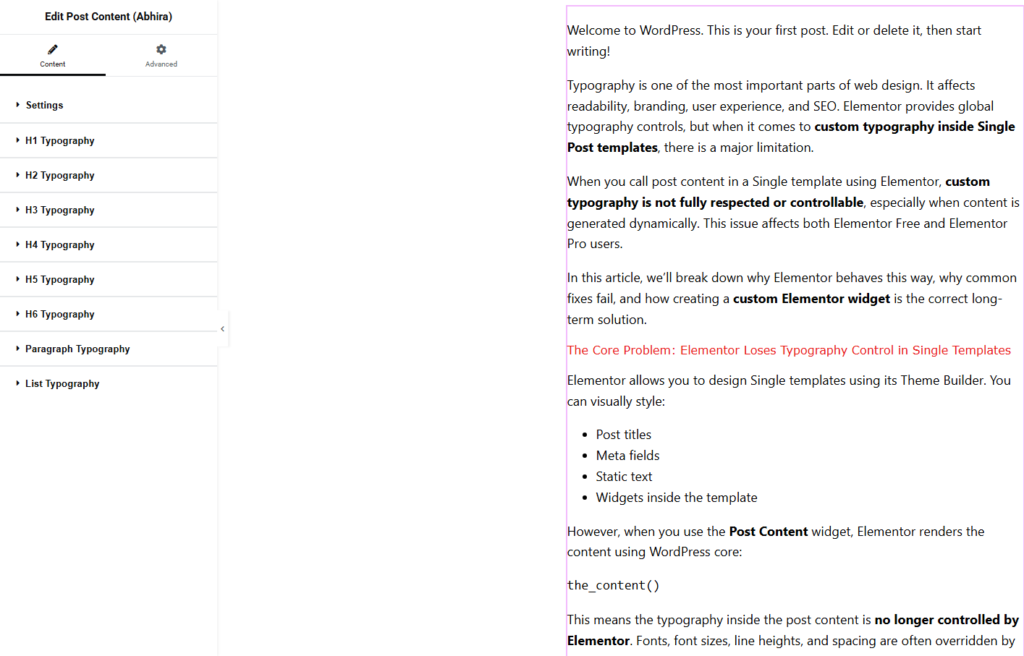
Typography is one of the most important parts of web design. It affects readability, branding, user experience, and SEO. Elementor provides global typography controls, but when it comes to custom typography inside Single Post templates, there is a major limitation.
When you call post content in a Single template using Elementor, custom typography is not fully respected or controllable, especially when content is generated dynamically. This issue affects both Elementor Free and Elementor Pro users.
In this article, we’ll break down why Elementor behaves this way, why common fixes fail, and how creating a custom Elementor widget is the correct long-term solution.
The Core Problem: Elementor Loses Typography Control in Single Templates
Elementor allows you to design Single templates using its Theme Builder. You can visually style:
- Post titles
- Meta fields
- Static text
- Widgets inside the template
However, when you use the Post Content widget, Elementor renders the content using WordPress core:
the_content()
This means the typography inside the post content is no longer controlled by Elementor. Fonts, font sizes, line heights, and spacing are often overridden by theme styles or editor defaults.
Why Elementor Cannot Fully Control Typography in Dynamic Content
This is not a bug. It is how WordPress and Elementor are designed.
WordPress stores post content as raw HTML. When Elementor renders a Single template, it injects that content without wrapping it in Elementor-managed typography controls.
As a result:
- Global typography settings do not apply consistently
- Theme styles leak into Elementor layouts
- Different blocks render with different font rules
Even Elementor Pro does not solve this problem.
Why This Becomes a Serious Problem at Scale
For small sites, inconsistent typography is annoying. For large or professional sites, it is dangerous.
- Brand typography breaks across posts
- Design consistency is lost
- Content readability suffers
- Maintenance becomes difficult
Most teams only notice this problem after publishing dozens or hundreds of posts.
Common Fixes (And Why They Are Not Real Solutions)
1. Theme-Level CSS Overrides
Hardcoding typography in theme CSS works until the next theme update or content variation.
2. Inline Styles in Post Content
This pollutes content, breaks portability, and kills long-term maintainability.
3. Elementor Global Typography Settings
Global settings do not consistently affect dynamic content rendered via the_content().
These methods treat symptoms, not the cause.
The Correct Approach: Custom Elementor Widget for Typography Control
The only reliable solution is to create a custom Elementor widget that wraps dynamic content inside Elementor-controlled typography settings.
This widget becomes the typography “bridge” between WordPress content and Elementor’s design system.
Benefits include:
- Consistent typography across all posts
- Full control over fonts, spacing, and alignment
- Compatibility with Elementor Free and Pro
- Clean separation of content and design
<?php
/**
 * Plugin Name: AbhiraWP Post Content Typography for Elementor
 * Description: Full typography control for post content inside Elementor Single templates.
 * Version: 1.0.0
 * Author: Abhira Yadhuvanshi
 * Text Domain: abhirawp
 */

if ( ! defined( 'ABSPATH' ) ) {
    exit;
}

final class ABHIRAWP_Post_Content_Typography_Plugin {

    public function __construct() {
        add_action( 'plugins_loaded', [ $this, 'init' ] );
    }

    public function init() {

        if ( ! did_action( 'elementor/loaded' ) ) {
            return;
        }

        add_action( 'elementor/widgets/register', [ $this, 'register_widgets' ] );
    }

    public function register_widgets( $widgets_manager ) {

        require_once __DIR__ . '/widgets/post-content-typography.php';

        $widgets_manager->register(
            new \ABHIRAWP_Post_Content_Typography_Widget()
        );
    }
}

new ABHIRAWP_Post_Content_Typography_Plugin();
How a Custom Typography Widget Works
Instead of relying on the default Post Content widget, the custom widget:
- Fetches post content using
get_the_content() - Applies Elementor typography controls
- Wraps output in a controlled HTML container
This ensures all typography is managed by Elementor, not the theme or editor.
Why This Solution Is Better for SEO and Accessibility
Search engines favor readable, consistent content.
With a custom widget, you can:
- Maintain consistent heading hierarchy
- Improve line length and spacing
- Enhance accessibility with readable fonts
- Avoid hidden or overridden text styles
This leads to better engagement and stronger SEO signals.
ELEMENTOR WIDGET (FULL FEATURED)

<?php
if ( ! defined( 'ABSPATH' ) ) {
    exit;
}

class ABHIRAWP_Post_Content_Typography_Widget extends \Elementor\Widget_Base {

    public function get_name() {
        return 'abhirawp-post-content';
    }

    public function get_title() {
        return __( 'Post Content (Typography)', 'abhirawp' );
    }

    public function get_icon() {
        return 'eicon-text';
    }

    public function get_categories() {
        return [ 'theme-elements' ];
    }

    protected function register_controls() {

        /* =====================
         * CONTENT SETTINGS
         * ===================== */
        $this->start_controls_section(
            'abhirawp_section_content',
            [
                'label' => __( 'Content Settings', 'abhirawp' ),
            ]
        );

        $this->add_control(
            'abhirawp_allowed_post_types',
            [
                'label'   => __( 'Allowed Post Types', 'abhirawp' ),
                'type'    => \Elementor\Controls_Manager::SELECT2,
                'options' => get_post_types( [ 'public' => true ], 'names' ),
                'multiple' => true,
                'default' => [ 'post' ],
            ]
        );

        $this->add_control(
            'abhirawp_hide_default_content',
            [
                'label'        => __( 'Hide Default Elementor Post Content', 'abhirawp' ),
                'type'         => \Elementor\Controls_Manager::SWITCHER,
                'return_value' => 'yes',
            ]
        );

        $this->end_controls_section();

        /* =====================
         * BODY TYPOGRAPHY
         * ===================== */
        $this->start_controls_section(
            'abhirawp_section_body_typography',
            [
                'label' => __( 'Body Typography', 'abhirawp' ),
                'tab'   => \Elementor\Controls_Manager::TAB_STYLE,
            ]
        );

        $this->add_group_control(
            \Elementor\Group_Control_Typography::get_type(),
            [
                'name'     => 'abhirawp_body_typography',
                'selector' => '{{WRAPPER}} .abhirawp-post-content',
            ]
        );

        $this->add_responsive_control(
            'abhirawp_paragraph_spacing',
            [
                'label' => __( 'Paragraph Spacing', 'abhirawp' ),
                'type'  => \Elementor\Controls_Manager::SLIDER,
                'selectors' => [
                    '{{WRAPPER}} .abhirawp-post-content p' => 'margin-bottom: {{SIZE}}{{UNIT}};',
                ],
            ]
        );

        $this->end_controls_section();

        /* =====================
         * HEADING TYPOGRAPHY
         * ===================== */
        foreach ( range( 1, 6 ) as $h ) {

            $this->start_controls_section(
                "abhirawp_section_h{$h}",
                [
                    'label' => sprintf( __( 'Heading H%d Typography', 'abhirawp' ), $h ),
                    'tab'   => \Elementor\Controls_Manager::TAB_STYLE,
                ]
            );

            $this->add_group_control(
                \Elementor\Group_Control_Typography::get_type(),
                [
                    'name'     => "abhirawp_h{$h}_typography",
                    'selector' => "{{WRAPPER}} .abhirawp-post-content h{$h}",
                ]
            );

            $this->end_controls_section();
        }

        /* =====================
         * LIST SPACING
         * ===================== */
        $this->start_controls_section(
            'abhirawp_section_list_spacing',
            [
                'label' => __( 'List Spacing', 'abhirawp' ),
                'tab'   => \Elementor\Controls_Manager::TAB_STYLE,
            ]
        );

        $this->add_responsive_control(
            'abhirawp_list_spacing',
            [
                'label' => __( 'List Bottom Spacing', 'abhirawp' ),
                'type'  => \Elementor\Controls_Manager::SLIDER,
                'selectors' => [
                    '{{WRAPPER}} .abhirawp-post-content ul, {{WRAPPER}} .abhirawp-post-content ol' => 'margin-bottom: {{SIZE}}{{UNIT}};',
                ],
            ]
        );

        $this->end_controls_section();
    }

    protected function render() {

        global $post;

        if ( ! $post ) {
            return;
        }

        $settings = $this->get_settings_for_display();

        if ( ! empty( $settings['abhirawp_allowed_post_types'] ) &&
            ! in_array( get_post_type( $post ), $settings['abhirawp_allowed_post_types'], true ) ) {
            return;
        }

        if ( 'yes' === $settings['abhirawp_hide_default_content'] ) {
            remove_action( 'elementor/frontend/the_content', 'elementor_do_post_content' );
        }

        echo '<div class="abhirawp-post-content">';
        echo apply_filters( 'the_content', get_the_content() );
        echo '</div>';
    }
}
Does This Work in Elementor Free and Pro?
Yes.
The solution does not rely on Pro-only features. It works with:
- Elementor Free
- Elementor Pro
This makes it ideal for a standalone plugin.
What We’ll Build Next: A Lightweight Typography Control Plugin
In the next guide, we’ll create a clean Elementor plugin that:
- Adds a custom Post Content Typography widget
- Provides full font and spacing controls
- Respects WordPress standards
- Remains compatible with future Elementor updates
This solves one of Elementor’s most overlooked limitations.
Final Thoughts
Elementor is a powerful design tool, but dynamic content typography is still a weak point.
If you care about design consistency, performance, and long-term scalability, creating a custom Elementor widget is not optional — it is necessary.
This approach respects how WordPress works while giving Elementor the control it was meant to have.