

Contact Form 7 (CF7) is one of the most popular form plugins in the WordPress ecosystem. It’s lightweight, flexible, and easy to customize. But there’s a catch—Contact Form 7 does NOT store form submissions in your database by default.
If you don’t configure storage manually, you lose every submission the moment it’s sent.
This guide gives you the complete solution, from beginner-friendly plugins to advanced custom database integrations for developers.
Let’s break it down the right way.
Why Contact Form 7 Doesn’t Store Data by Default
CF7 was designed to be lightweight and email-focused. It sends data via email but avoids storing anything on the site to:
- Reduce database load
- Minimize GDPR complications
- Keep the plugin simple & fast
If you run a business website, losing entries is not an option. So let’s fix it.
Method 1: Store CF7 Submissions Using Flamingo (Beginner-Friendly)
For most users, Flamingo is hands-down the simplest and most reliable way to store CF7 data.
It’s developed by the same author who built Contact Form 7.
Why Flamingo is recommended
- Zero configuration
- Free
- Native compatibility
- Stores all submissions in WP Admin
- Exports in CSV
- No coding required
How to Use Flamingo
- Go to Plugins → Add New
- Search for Flamingo
- Install & Activate
- Visit Flamingo → Inbound Messages
That’s it. All future CF7 submissions are stored automatically.
Method 2: Save Contact Form 7 Data in a Custom Database Table (Developer Method)
If you want full control, analytics, or custom dashboards, then store submissions in your own database table.
Below is the exact solution used by many production websites.
Step 1: Create a Custom Database Table
Add this code in your custom plugin or theme functions.php:
  function abhirawp_create_cf7_table() {
    global $wpdb;
    $table_name = $wpdb->prefix . 'cf7_entries';
    $charset_collate = $wpdb->get_charset_collate();

    $sql = "CREATE TABLE $table_name (
        id mediumint(9) NOT NULL AUTO_INCREMENT,
        form_id int NOT NULL,
        submission_time datetime DEFAULT CURRENT_TIMESTAMP,
        data longtext NOT NULL,
        PRIMARY KEY  (id)
    ) $charset_collate;";

    require_once(ABSPATH . 'wp-admin/includes/upgrade.php');
    dbDelta($sql);
 }
 register_activation_hook(__FILE__, 'abhirawp_create_cf7_table');
Step 2: Capture form submission using CF7 hook
  add_action('wpcf7_before_send_mail', 'abhirawp_store_cf7_data');

  function abhirawp_store_cf7_data($contact_form) {
    global $wpdb;

    $submission = WPCF7_Submission::get_instance();
    if (!$submission) return;

    $data = $submission->get_posted_data();
    $form_id = $contact_form->id();
    $table = $wpdb->prefix . 'cf7_entries';

    $wpdb->insert(
        $table,
        [
            'form_id' => $form_id,
            'data'    => json_encode($data)
        ]
    );
  }
What this does:
- Captures every form submission
- Stores it in your custom DB table
- Saves clean JSON for easy export
- Works with any CF7 form
Save to Custom Post Type (If you want admin editing & Search)
Another dev-friendly method is turning each submission into a “post entry.
add_action('wpcf7_before_send_mail', function($form){

    $submission = WPCF7_Submission::get_instance();
    if (!$submission) return;

    $data = $submission->get_posted_data();

    $post_id = wp_insert_post([
        'post_type'  => 'cf7_entry',
        'post_title' => 'Form Submission - ' . current_time('mysql'),
        'post_status'=> 'publish'
    ]);

    foreach ($data as $key => $value) {
        update_post_meta($post_id, $key, $value);
    }

});
Which one should YOU use?
| Method | Best For |
|---|---|
| Flamingo | Beginners, quick setup, reliable storage |
| Custom DB Table | Developers building dashboards, APIs, analytics |
| CPT Storage | Admin-friendly display + searchable data |
Why this method works
- No custom database needed
- Easy to view entries
- Can assign user permissions
- Works great for CRM-style workflows
Extra Tip: A Smarter Way to Manage CF7 Submissions (If You Want More Control)
The methods above—Flamingo, custom tables, and CPT-based storage—cover most use cases.
But many site owners still struggle with something: managing entries after they’re stored.
That’s where a dedicated CF7 entry-management tool can make life much easier.
1. You Get a Clean Dashboard to See All Submissions at a Glance
Most users just want a simple place where all entries sit in one clean, organized table.
A good management tool shows:
- Form name
- Submission time
- All field data
- Easy “View” button
So instead of jumping between emails or searching database tables, everything becomes accessible in seconds.
2. You Can Add Notes to Entries (Great for Follow-Ups)
Let’s be honest. When leads start coming in, you need a way to remember:
- Who you contacted
- What was discussed
- What action needs to be taken next
Notes help you keep track without depending on spreadsheets or messy inboxes.
3. You Can Reply Directly From the Dashboard
Many users reply to form enquiries using their inbox, but that scatters the communication in different places.
With a reply feature:
- You write back directly from the entry page
- The system logs your reply
- You keep a full history in one place
Makes follow-ups much easier for freelancers, businesses, and agencies.
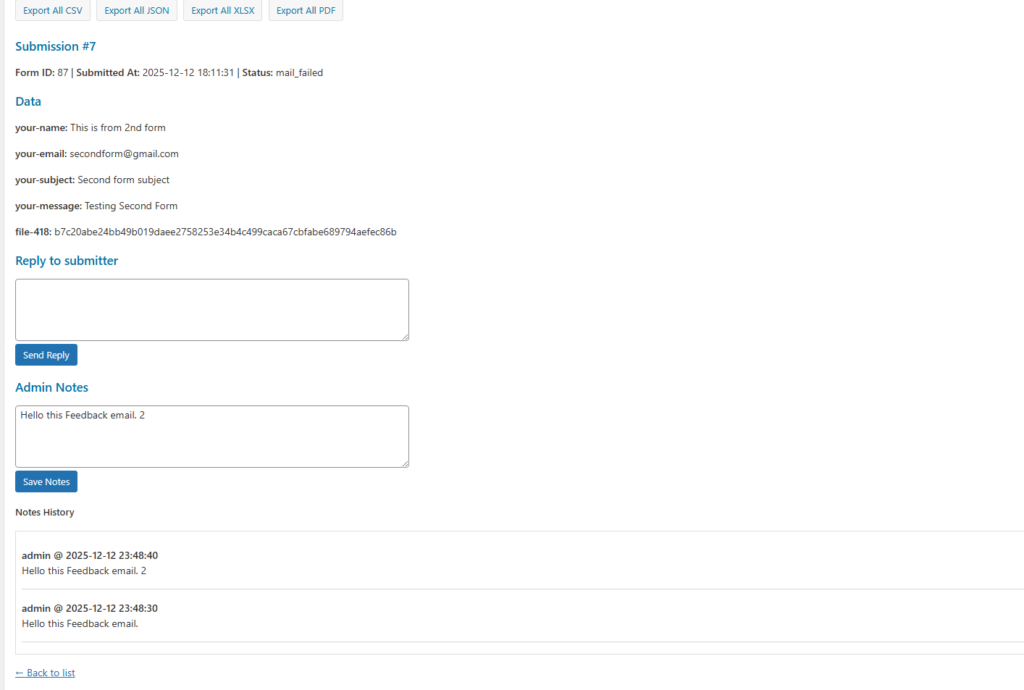
4. Everything Stays Logged in a Timeline
A timeline view helps you understand the story behind each enquiry:
- When the form was submitted
- Notes you added
- Replies you sent
- Follow-up actions
This is extremely useful for support tickets, sales leads, or client onboarding.
5. You Can Search Anything Instantly
If you’re receiving a lot of submissions, scrolling is a pain.
Advanced search lets you find entries by:
- Name
- Phone
- Keywords
- Any CF7 field value
This saves a crazy amount of time when the data starts piling up.
6. You Keep the Database Clean
With one-click delete, you can remove:
- Spam
- Test submissions
- Unwanted data
It keeps your site fast and your data organized.
7. Everything Is Stored in an Optimized Table (Better for Speed)
Instead of dumping data into WordPress meta tables or default post tables, tools built for CF7 submissions use a dedicated structure.
This gives you:
- Faster queries
- No unnecessary bloat
- Smooth performance even with thousands of entries
It’s a straightforward, future-proof way to handle storage
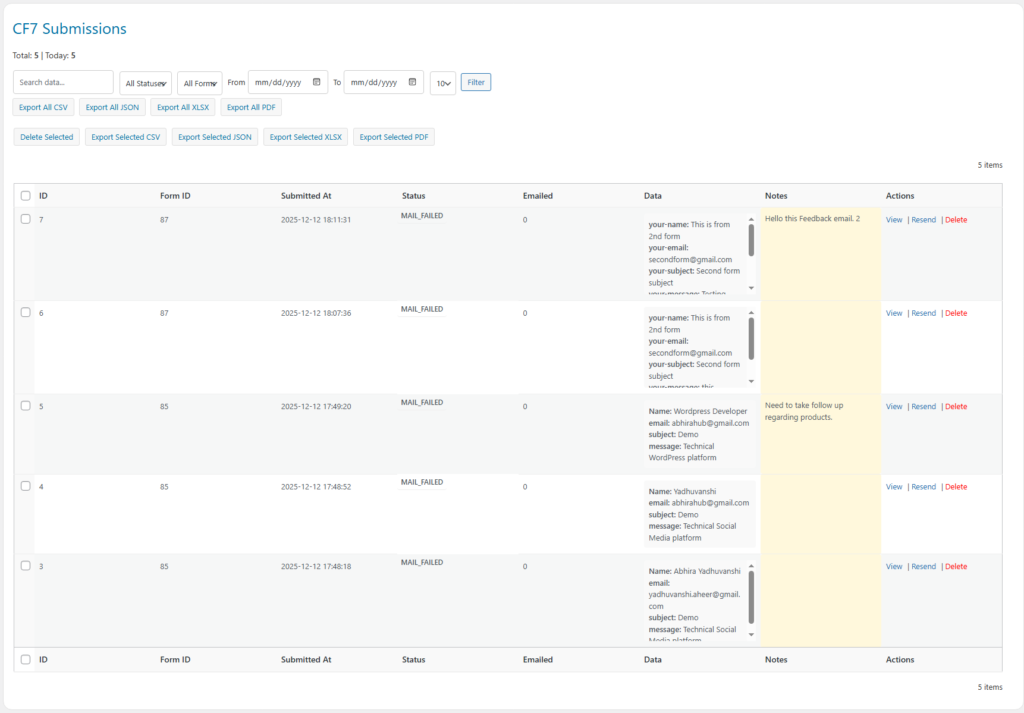
Extra Power Features That Make Managing CF7 Submissions Even Easier
Once your form entries are safely stored, the next challenge is handling the data—exporting it, sharing it with clients, analyzing it, or backing it up. That’s where having the right tools really pays off.
Below are some extremely practical features that help users work smarter with their CF7 submissions.
1. Export All Entries in Multiple Formats
Most users eventually need to move their form data somewhere—Excel, Google Sheets, CRM tools, or for offline storage.
Having multi-format export options makes that painless.
You can download all entries as:
- CSV – perfect for spreadsheets and CRM imports
- JSON – ideal for developers or API workflows
- XLSX – easy for Excel and business reports
- PDF – shareable documents for clients or teams
This saves hours compared to manually copying data or building custom scripts.
2. Export Selected Entries Only (No More “Export Everything”)
Sometimes you don’t need the entire database.
Maybe you’re sending only this week’s leads to a client… or exporting filtered results for a specific report.
With selective export, you can:
- Check the entries you want
- Export only those in CSV, JSON, XLSX, or PDF
- Avoid bloated files
- Share only what’s relevant
It’s efficient, tidy, and practical.
3. Bulk Delete for Quick Cleanup
Every site collects junk:
- Spam entries
- Bot submissions
- Old records
- Test forms
- Mistakes
Bulk delete lets users clean things up in one quick action instead of manually removing entries one by one.
A small thing—but a massive time-saver when the entries pile up.
4. Why These Features Matter in Real Life
These export and bulk-management tools aren’t just “extras.”
They solve real problems users face every day:
- Agencies can export monthly reports for clients
- Business owners can store PDFs for compliance
- Developers can use JSON for custom integrations
- Excel users can analyze data in XLSX
- Teams can back up submissions offline
- Anyone can clean their database instantly
It gives users full control over their submission data without touching the database or writing a single query.
